posv-110.cfm

INVENTORY CONCEPTS
COST OF INVENTORY
Topics
Overview
POS-2200 provides several methods for recording, controlling, and reporting costs.
In its simpliest form, a single cost is carried in the inventory file for each item and that number is updated manually.
A more complete costing maintains a record of all receipts of merchandise in a perpetual inventory file which provides various average cost methods.
Inventory Quantity Control
I you run the Receipt of Merchandies program, the system will record all receipts, by date, in the "RM" (Receive Merchandise) file. This file can be thought of as a perpetual inventory file. It is separate from the standard quantity-on-hand kept in the inventory file. When items are sold the quantity is subtracted from the inventory files's QOH. Then the quantity is reduced in the RM file on a FIFO or LIFO basis.
Items are removed from the RM file as they are sold. The system supports LIFO (last in, first out) and FIFO (first in, first out) methods.
Average costs are recomputed after every receipt and every sale for each item.
Topics
Costing methods
The POS-2200 System supports three costing methods:
- STANDARD COST: This represents the value stored in the inventory file. It is essentially a hand entered value. The system does not calculate this value
- AVERAGE COST: This is a historic average. It's computed each time inventory is received. The calculation is base on the total quantity received historically and the cost of those receipts at the time of the receipt.
- ROLLING AVERAGE COST: This is the average cost of the current stock based on the cost of those goods when received.
These costs methods require that receipts be logged historically and that inventory be subtracted from those historic receipts as sales are made.
The "RM" (Receipt of Merchandise) file provides the history. A new record is written into this file each time an item is received. That record records the quantity received and the cost at the time of receipt.
Each receipt record stores the date, quantity received, quantity sold, and cost.
The quantity received minus the quantity sold yields a quantity left for any item at any time.
As sales are made the system will run through the RM records for that item and increment the quantity sold value as necessary. for example:
receipt 1:    5 items
receipt 2:    6 items

sale 1:       3 items - record 3 sold for receipt 1
sale 2:       3 items - record 2 more sold for receipt 1 and 1 sold for receipt 2

THE RM NOW SHOWS:
receipt 1:    5 items  5 sold  0 available
receipt 2:    6 items  1 sold  5 available
THREE PURCHASES BEFORE ANY SALES:


rcv      sold    avail     cost  extended   curr-val

 5         0       5         5     25         25

 6         0       6         7     42         42

 2         0       2         6     12         12


TOTALS                                              avg  rolling

13         0      13               79         79   6.07    6.07


FIRST SALE of 7 ITEMS


rcv      sold    avail     cost  extended   curr-val

 5         5       0         5     25          0

 6         2       4         7     42         28

 2         0       2         6     12         12


TOTALS                                              avg  rolling

13         0       6               79         40   6.07    6.66


avg =  total-extended / total-received


rolling = total-available / total-curr-val
AVERAGE FOR THE ONE SALE:


FOR THAT FIRST SALE:

5 sold at $5 cost = $25  (from receipt 1)

2 sold at $7 cost = $14  (from receipt 2)

TOTAL

7 sold at $39 or $5.57 actual avg each
Topics
Configuration Settings
The SETTINGS screen in the Supervisor menu offers a tab for SALES. This form includes the sales tax, the option to ask for a clerk ID on each sale, and the COSTING options. We'll talk about costing options here.
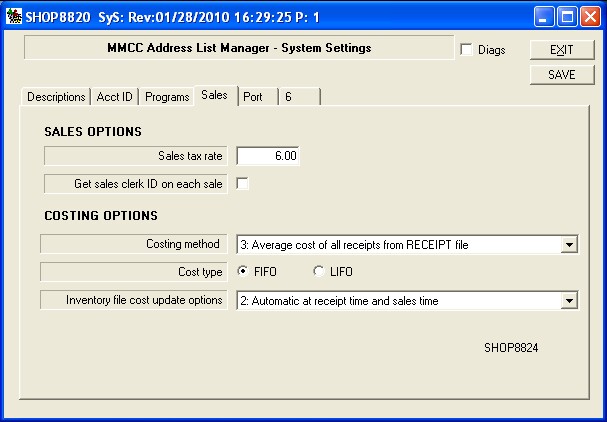
Costing Method
When an item is sold it can be assigned one of four different costs as definded below.
The cost is stored in the CO (order detail) record. If an item's cost changes in the future,
the cost at the time of sale is still reflected in the CO file record.
- Standard cost found in the item record.
This is the cost found in the SI (Inventory) file at the time of the sale.
That cost may have been updated manually or automatically, but whatever is
in the file at sale time is the cost that is recorded.
- Cost of last receipt from the RECEIPT file.
The cost entered with a receipt of inventory is recorded in the RM file as the receipt is posted.
The last receipt cost is simply the historical last cost in the file.
- Average cost of all receipts from the RECEIPT file.
Each time a receipt is posted the system calculates an historic average cost.
This is calculated solely on the quantity received and the cost at that time.
If the item's cost increases with time, this average covers the entire range
of purchases.
- Rolling Average cost of stock on hand from the Receipt file.
This the average cost of the stock on hand.
As items are sold they are removed from the perpetual inventory in the RM file
using either the FIFO or LIFO method.
A new rolling average is computed after
each receipt or sale of the item.
That means that a sales is recorded with the cost at the time of the sale.
Only then is the new rolling average computed. So the next sale of the same
item may have a different rolling average cost.
Cost Type
The system supports both FIFO and LIFO costing.
This only comes into play when an item is sold.
The system first reduces the overall quantity on hand in the inventory file.
Then it runs through the perpetual inventory in the RM file and reduces the
quantity on each receipt until the quantity sold is used up.
(The quantity received is not changed in the RM file. Rather the system accumulates
a quantity sold. The quantity left is the received quantity minus the sold quantity.
This allows future calculation of both the overall average cost and the rolling average
cost.)
- FIFO: First in, First out (default)
- LIFO: Last in, First out.
Inventory file cost update options
The average costs are always maintained in the RM file. You don't have to do anything and there is no option.
The cost in the INVENTORY file, on the other hand, can be updated automatically or manually, based on this option.
This is significant if you choose Costing Method 1 (above) which says that the "standard cost" from the inventory
file is the one to be used when costing a sale.
- Manual update in inventory maintenance.
The cost is not automatically updated by the system. You have to change the costs by hand.
- Automatic at receipt time and sales time.
The automatic method keeps the standard cost in the inventory updated at all times. Each time you
receive inventory that cost changes. Each time you make a sale (if you're using the rolling average
cost) the inventory cost changes.
Topics
Programs That Control Inventory and Costs
The perpetual inventory and the costs are controlled by only a few programs.
SHOP5010 - Sales Order Entry
At the end of a sale the SHOP5011 module within SHOP5010 updates the order, history,
inventory, and Receipts fies.
Cost and inventory are processed in the following order for each item.
- The current cost is recorded in the order details file.
- The quantity on hand in the SI (inventory) file is reduced.
- The quantity sold is recorded in the RM (perpetual inventory)
using the FIFO or LIFO method.
- The new rolling average cost is computed and stored in the
RM (perpetual inventory) file.
- If automatic updates are configured, and the rolling average cost is
the selected method, that new average is updated to the SI (inventory) file.
(Note that if an item appears more than one time in the order, this sequence is run for
each line that the item appears on. If you are using a rolling avg cost that could mean
the item has a different cost for each line.)
This is the "new" inventory screen. It presents a list of items for a selected vendor.
When you click on an item in the list a number of buttons show up at the bottom of the
screen.
One of those buttons is "Receipts".
It calls the SHOPX145 loadmod to review receipts and perpetual inventory for the
selected item. (This program has a number of options and is described below.)
SHOP4140 - Receive Inventory Screen
This is the screen where you enter receipt of merchandise.
You start by identifing a vendor and giving a date of receipt.
That starts a list of items, costs, quantities, etc.
This program does NOT update the inventory. It merely maintains a receipt list.
When your list is completed you can click a button to call the SHOPX145 loadmod
receive the list into inventory and record the receipt in the RM (perpetual inventory) file.
(This program has a number of options and is described below.)
SHOPX140 (loadmod) - Post Recipt of Merchandise to the Perpetual Inventory (RM)
This program processes a receipt of merchandise.
It is called from the SHOP4140 receiving screen.
The objects on this screen have a yellow background to make it obvious that you are
not still in the receipt data entry program.
The program has a checkbox for a LIVE RUN and one for HARDCOPY.
The Live Run checkbox allows the program to be run in a trial mode for testing.
You are asked for confirmation either way.
The hardcopy checkbox allows you to print a report as you post the update.
SHOPX145 (loadmod) - View, Print, Test the Perpetual Inventory (RM)
This program provides a simply screen for viewing the perpetual inventory for any one item.
You can optionlally print a report for the selected item.
This processes one item at a time.
The program also includes buttons for testing, and potentially updating, the average costs
for an item.
SHOPI145 - Perpetual Inventory (RM) maintenance INCLUDE.
This is a standard "include" module that becomes part of most of the programs
listed here. This unit contains standard routines for reducing the perpetual inventory
and for computing average costs.
Topics
© 2003 - 2026 MMCC - All Rights Reserved.
Contact MMCC at
support@mmcctech.com